Can you self-clean a KitchenAid oven? Yes, you absolutely can. The KitchenAid oven self-cleaning cycle is a fantastic feature designed to make oven cleaning significantly easier. This guide will walk you through the process, from preparation to post-cleaning care, ensuring your KitchenAid oven shines. We’ll cover everything you need to know to safely and effectively use your oven’s self-clean function and tackle those stubborn messes.
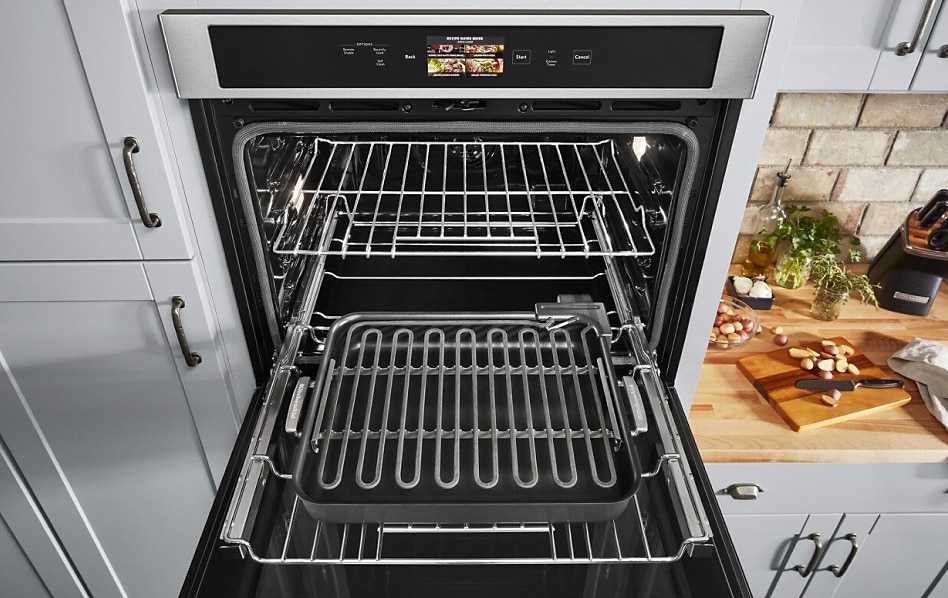
Image Source: www.kitchenaid.com
Preparing Your KitchenAid Oven for the Self-Clean Cycle
Before you initiate the KitchenAid oven self-cleaning cycle, proper preparation is key to a safe and effective cleaning. This isn’t just about pressing a button; it’s about ensuring your oven and your kitchen are ready for the intense heat and process.
Essential Pre-Clean Checks
- Read Your Manual: First and foremost, consult your specific KitchenAid oven model’s manual. Different models might have slight variations in the self-cleaning process or specific recommendations. This is your ultimate guide.
- Remove Oven Racks and Accessories: Clean oven racks and any other accessories like oven thermometers or pizza stones must be removed. The extreme heat of the self-clean cycle can damage their finish, warp them, or even cause them to discolor. Some manuals may suggest manual cleaning of the racks separately before the cycle.
- Wipe Up Large Debris: While the self-clean cycle burns off food residue, large chunks of food or grease can create excessive smoke and odor. Take a moment to wipe out any significant spills or debris from the oven floor and walls with a damp cloth. This will help minimize avoiding oven fumes during the cycle.
- Secure the Oven Door: Ensure the oven door is properly closed. The locking mechanism is crucial for safety during the high-temperature cycle.
Addressing Potential Fumes and Safety
- Ventilate Your Kitchen: Even with careful preparation, some avoiding oven fumes is often unavoidable. Open windows and turn on your kitchen exhaust fan before starting the cycle. Consider running a fan to help circulate air out of your home.
- Keep Pets and Children Away: The self-cleaning cycle uses very high temperatures, reaching up to 800°F (427°C) or more, to incinerate food soil. This intense heat can be dangerous. Keep children and pets, especially birds, out of the kitchen and away from the oven during the entire cleaning process and until the oven has completely cooled down. Birds are particularly sensitive to fumes that can be released.
- Check Oven Seals: Inspect the oven door gasket. If it’s damaged or loose, it might not seal properly, allowing heat and fumes to escape. In such cases, it’s best to postpone the self-clean cycle and have the gasket replaced.
Initiating the KitchenAid Oven Self-Cleaning Cycle
Once you’ve completed the preparation steps, you’re ready to start the self-clean cycle on your KitchenAid oven.
Locating and Activating the Self-Clean Feature
The exact location of the self-clean button or setting can vary slightly depending on your specific KitchenAid oven model. However, you’ll generally find it on the control panel.
- Control Panel Navigation: Look for a button or a setting labeled “Self-Clean,” “Clean,” or a similar icon.
- Cycle Duration: Most KitchenAid ovens allow you to select the duration of the self-cleaning cycle. Common options include 2, 3, or 4 hours, with longer cycles typically for heavily soiled ovens. The manual will provide guidance on choosing the appropriate duration. Some models may have an “Auto” setting that determines the duration based on soil level.
- Starting the Cycle: Once you’ve selected the cycle and duration, press the “Start” button. The oven door will automatically lock to prevent accidental opening.
Understanding the Self-Clean Process
The how to use self-clean feature is straightforward once you know where to find it on your control panel. The oven heats to extremely high temperatures, turning food residue into ash.
- High Temperature Operation: The oven’s internal temperature will rise significantly, far beyond normal cooking temperatures. This is what incinerates the food particles.
- Door Locking Mechanism: As mentioned, the door locks automatically for safety. It will remain locked until the oven has cooled down to a safe temperature, typically below 250°F (121°C). This can take a considerable amount of time after the heating cycle has finished.
Post-Clean Procedures and Maintenance
After the self-clean cycle has completed and the oven has cooled sufficiently for the door to unlock, there are still a few steps to take to finish the process.
Cleaning Up the Ash
Once the door unlocks, you’ll find a fine layer of ash on the oven floor and walls.
- Wipe with a Damp Cloth: Use a damp cloth or sponge to wipe away the ash residue. You may need to rinse the cloth multiple times.
- Stubborn Spots: For any remaining residue, a non-abrasive cleaner or a paste made from baking soda and water can be helpful. Avoid using harsh chemical oven cleaners as they can damage the oven’s interior coating.
Reinstalling Oven Racks
- Clean Oven Racks: If you removed your oven racks for the cycle, it’s time to put them back. If they still have residue, now is a good time for manual oven cleaning KitchenAid or using a specialized oven rack cleaner.
- Placement: Ensure the racks are placed in their correct positions within the oven.
Regular Maintenance Tips for Your KitchenAid Oven
To keep your KitchenAid oven performing at its best and to minimize the need for frequent self-cleaning cycles, consider these maintenance tips:
- Wipe Spills Immediately: The best way to prevent tough stains is to wipe up spills and splatters as soon as the oven has cooled down.
- Use Oven Liners (Carefully): Some people use aluminum foil or oven liners at the bottom of the oven to catch drips. However, KitchenAid oven cleaning instructions often advise against covering the oven bottom, as this can block heat circulation and even damage the oven’s heating elements or the self-cleaning feature itself. Always check your manual for specific recommendations on liners.
- Manual Cleaning for Light Messes: For minor spills, manual oven cleaning KitchenAid with a mild detergent and a non-abrasive sponge is often sufficient and can extend the life of your oven’s interior coating. This also helps with degreasing oven interior before it becomes a major issue.
Alternative Cleaning Methods: Manual Cleaning Your KitchenAid Oven
While the self-clean cycle is convenient, there are times when manual oven cleaning KitchenAid is a better or necessary option. This is especially true for very old, heavily soiled ovens, or if you’re concerned about fumes.
When to Choose Manual Cleaning
- Sensitive Individuals: If you or someone in your household is sensitive to strong fumes, or if you have birds or other pets with respiratory issues, manual cleaning is the safer bet.
- Heavily Soiled Ovens: If your oven has accumulated a significant amount of grease and grime over time, the self-clean cycle might not be able to handle it all effectively in one go, and manual pre-treatment can help.
- Damaged Oven Components: If you suspect any damage to your oven’s door seal or interior enamel, avoid the self-clean cycle.
- Specific Cleaning Tasks: For targeted cleaning of specific areas or if you only need a light clean, manual methods are more efficient.
The Best Way to Clean Oven Interior Manually
Degreasing oven interior manually involves a bit of elbow grease and the right cleaning agents.
- Gather Your Supplies:
- Rubber gloves
- Baking soda
- Water
- White vinegar (in a spray bottle)
- Non-abrasive scrub sponge or cloth
- Old towels or newspapers to protect the floor
- A small bowl
- Create a Baking Soda Paste:
- In the small bowl, mix about ½ cup of baking soda with a few tablespoons of water. Add water gradually until you have a thick, spreadable paste.
- Wearing your rubber gloves, apply the paste to the inside surfaces of the oven. Avoid the heating elements and any electrical components. Focus on areas with heavy grease and grime.
- Let the paste sit for at least 12 hours, or overnight, to allow it to break down the grease.
- Scrubbing and Wiping:
- After the paste has had time to work, take a damp sponge or cloth and begin to wipe away the dried paste and loosened grime.
- For stubborn spots, use the sponge to gently scrub.
- Spray white vinegar onto any remaining baking soda residue. The vinegar will react with the baking soda, creating a fizzing action that helps lift the remaining grime.
- Wipe everything clean with a damp cloth. Rinse the cloth frequently.
- Rinse and Dry: Once you’ve removed all the baking soda and grime, wipe down the oven interior with a clean, damp cloth. Finally, dry the interior with a clean, dry towel.
Cleaning Oven Racks Manually
Cleaning oven racks can be tackled in a few ways:
- Soaking:
- Place old towels in your bathtub or a large sink to protect the surface.
- Lay the oven racks on top of the towels.
- Fill the tub or sink with hot water and add a generous amount of dish soap or a specialized oven cleaner.
- Let the racks soak for several hours or overnight.
- After soaking, scrub them with a non-abrasive scrub brush or sponge, then rinse and dry thoroughly.
- Baking Soda and Vinegar Paste: You can use the same baking soda paste described for the oven interior on the racks. Apply the paste, let it sit, scrub, and rinse.
- Commercial Oven Cleaner: For heavily soiled racks, a commercial oven cleaner specifically designed for racks can be effective. Always follow the product’s instructions carefully and wear gloves and eye protection. Ensure good ventilation.
Advanced KitchenAid Oven Cleaning Instructions and Tips
To achieve the best results and maintain your oven’s longevity, consider these advanced tips and instructions for your deep cleaning KitchenAid oven.
Understanding Self-Clean Oven Tips
These tips are crucial for maximizing the effectiveness of the self-clean cycle and ensuring a safe experience.
- Frequency: Avoid running the self-clean cycle too frequently. Most manufacturers recommend using it only a few times a year, or as needed. Overuse can stress the oven’s components.
- Pre-Treat Stubborn Stains: For very heavy grease buildup, it can be beneficial to manually pre-treat these areas before initiating the self-clean cycle. Use a mild degreaser or the baking soda paste method on specific spots. This can help the self-clean cycle be more effective and reduce smoke.
- Post-Cycle Inspection: After the oven cools and unlocks, inspect the interior. If there are still some stubborn spots, you can try a gentle manual scrub with a non-abrasive cleaner.
Best Way to Clean Oven Interior (Beyond Self-Clean)
If you’re looking for the best way to clean oven without the self-clean cycle, the baking soda paste method is highly effective. However, other natural options exist:
- Lemon and Water Steam Clean:
- Preheat your oven to 250°F (121°C).
- Place 1 cup of water and the juice of 2-3 lemons (or about 1/4 cup lemon juice) in an oven-safe dish.
- Place the dish in the preheated oven and let it steam for about 20-30 minutes.
- Turn off the oven and let it cool slightly.
- Carefully remove the dish and wipe down the interior with a damp cloth. The steam helps loosen grease and grime.
Troubleshooting Common Self-Clean Issues
- Excessive Smoke: This is often due to large food debris left in the oven. Ensure you’ve wiped out major spills before starting. If smoke persists, turn off the oven, let it cool, and then manually clean the problematic areas.
- Oven Door Won’t Unlock: The door will not unlock until the oven temperature has dropped to a safe level. This can take several hours after the cycle finishes. If it remains locked for an unusually long time (beyond what your manual suggests), there might be an issue with the locking mechanism, and you should contact customer support.
- Foul Odors: Some odor is normal, especially during the first few uses of the self-clean feature on a new oven, or when cleaning a heavily soiled oven. Ensure adequate ventilation. If odors are extremely pungent or persist long after cooling, contact a professional.
Frequently Asked Questions About Cleaning Your KitchenAid Oven
Q1: How often should I use the KitchenAid oven self-cleaning cycle?
A1: It’s generally recommended to use the self-clean cycle only a few times a year, or as needed based on oven usage and soiling. Overusing it can potentially shorten the lifespan of your oven’s components.
Q2: Can I clean the oven racks while the self-clean cycle is running?
A2: No, you must remove the oven racks before running the self-clean cycle. The extreme heat can damage their finish and warp them. Clean them separately using manual methods.
Q3: What should I do if my KitchenAid oven door won’t unlock after the self-clean cycle?
A3: The oven door is designed to stay locked until the internal temperature drops to a safe level, which can take several hours. Ensure the oven has had ample time to cool. If it remains locked for an extended period (consult your manual for specific times), there might be a malfunction, and you should contact KitchenAid customer support.
Q4: Are there any specific cleaners I should avoid when cleaning my KitchenAid oven?
A4: Yes, avoid using commercial oven cleaners, abrasive sponges, steel wool, or harsh chemicals on the interior surfaces, especially if you plan to use the self-clean feature. These can damage the enamel coating and the self-cleaning technology. Always stick to mild detergents, baking soda, or vinegar for manual cleaning, and follow your manual’s guidance.
Q5: Is it safe to leave my pets in the house while the KitchenAid oven self-cleaning cycle is running?
A5: It is highly recommended to remove pets, especially birds, from the home or at least the kitchen area during the self-cleaning cycle. The fumes released, even with proper ventilation, can be harmful to pets with sensitive respiratory systems.
By following these detailed steps and tips, you can confidently maintain a clean and efficient KitchenAid oven, whether you opt for the convenient self-clean cycle or prefer manual cleaning methods. Regular maintenance and careful execution of the cleaning process will ensure your oven serves you well for years to come.