Image Source: flamingoappliance.com
Your Guide On How Do You Drain A Kitchenaid Dishwasher
If you have Kitchenaid dishwasher standing water at the bottom of your machine after a cycle, it means your Kitchenaid dishwasher won’t drain. This guide will show you how to fix this common problem. We will walk through simple checks and fixes to get the water out and figure out why your dishwasher is not draining properly.
Why Water Stays in Your Dishwasher
When your Kitchenaid dishwasher won’t drain, the most obvious sign is Kitchenaid dishwasher standing water left inside. This happens because the water used to clean dishes cannot get out. Many things can stop the water from leaving. Figuring out the reason is the first step in troubleshooting Kitchenaid dishwasher drain problems.
Common Reasons Water Lingers
Several parts work together to drain your dishwasher. If any one of these parts has a problem, water can stay inside.
The Filter Blockage
Your dishwasher has filters at the bottom. Their job is to catch food bits and dirt before they go down the drain. If you don’t clean these filters often, they can get full. A full filter stops water from reaching the drain and pump. This is a very common cause of Kitchenaid dishwasher standing water. It’s usually easy to fix by cleaning the filter. We will show you how to clean Kitchenaid dishwasher filter correctly.
The Drain Hose Obstruction
After water leaves the dishwasher body, it flows through a hose. This hose goes to your house drainpipe or garbage disposal. This hose can get bent or twisted, stopping water flow. Food bits or other small things can also get stuck inside the hose. If the hose is blocked, the water cannot get out. You may need to unclog Kitchenaid dishwasher drain hose.
The Pump Problem
The Kitchenaid dishwasher drain pump is like a small motor. It pushes the water out of the dishwasher and through the hose. If the pump is broken or something is stuck in it, it cannot push the water out. Sometimes, small broken pieces of plastic or glass from dishes can get into the pump area. This can stop the pump from spinning. A pump problem often means your Kitchenaid dishwasher won’t drain at all.
Air Gap Issues (If You Have One)
Some homes have an air gap. It’s a small part on your kitchen counter near the sink. It helps prevent dirty drain water from flowing back into your dishwasher. If this air gap gets blocked with food bits or grease, water can back up into the dishwasher instead of draining. Not all homes have an air gap. Look for a small metal cap or cover on your counter near the faucet to see if you have one.
Garbage Disposal Connection
If your dishwasher drain hose connects to your garbage disposal, the disposal needs to be clear. If the disposal is full of food or not working, it can block the dishwasher drain hose. Also, when a garbage disposal is new or replaced, there is often a plug inside the connection point where the dishwasher hose attaches. This plug must be removed. If it was not removed, water cannot drain.
Control or Power Glitches
Sometimes, the dishwasher’s computer brain (the control board) might have a problem. It tells the drain pump when to turn on. If there’s a glitch, it might not tell the pump to start. Power problems or even a faulty door latch can also stop the drain cycle. Sometimes, a simple reset Kitchenaid dishwasher can fix these small issues. The dishwasher might also show a Kitchenaid dishwasher error code related to draining if the problem is electronic.
Getting Started: First Checks
Before you start taking things apart, do a few quick and simple checks. These steps can sometimes fix the issue without needing deeper troubleshooting Kitchenaid dishwasher drain.
Simple Things to Look For
Take a moment to look at the dishwasher and listen to it.
Is the Cycle Done?
Make sure the wash cycle is completely finished. Some dishwashers have different stages, and water might sit briefly between stages. Check the control panel lights or display to confirm the cycle is over. If the dishwasher is still running, the water might drain soon.
Is the Door Fully Closed?
The dishwasher won’t run or drain properly if the door isn’t fully latched. Open and re-close the door firmly. Make sure nothing is blocking it from closing tightly.
Power Check
Make sure the dishwasher has power. Is the power cord plugged in? Is the circuit breaker tripped? A lack of power means nothing will work, including the drain pump.
Solving the Drain Problem Step-by-Step
Now, let’s go through the steps to try and fix the drain issue. Always turn off power to the dishwasher before doing any work inside or around it. Find the circuit breaker for the dishwasher and turn it off.
Clearing the Filter
Cleaning the filter is one of the easiest and most common fixes for Kitchenaid dishwasher standing water. This is how you clean Kitchenaid dishwasher filter.
Finding Your Filter
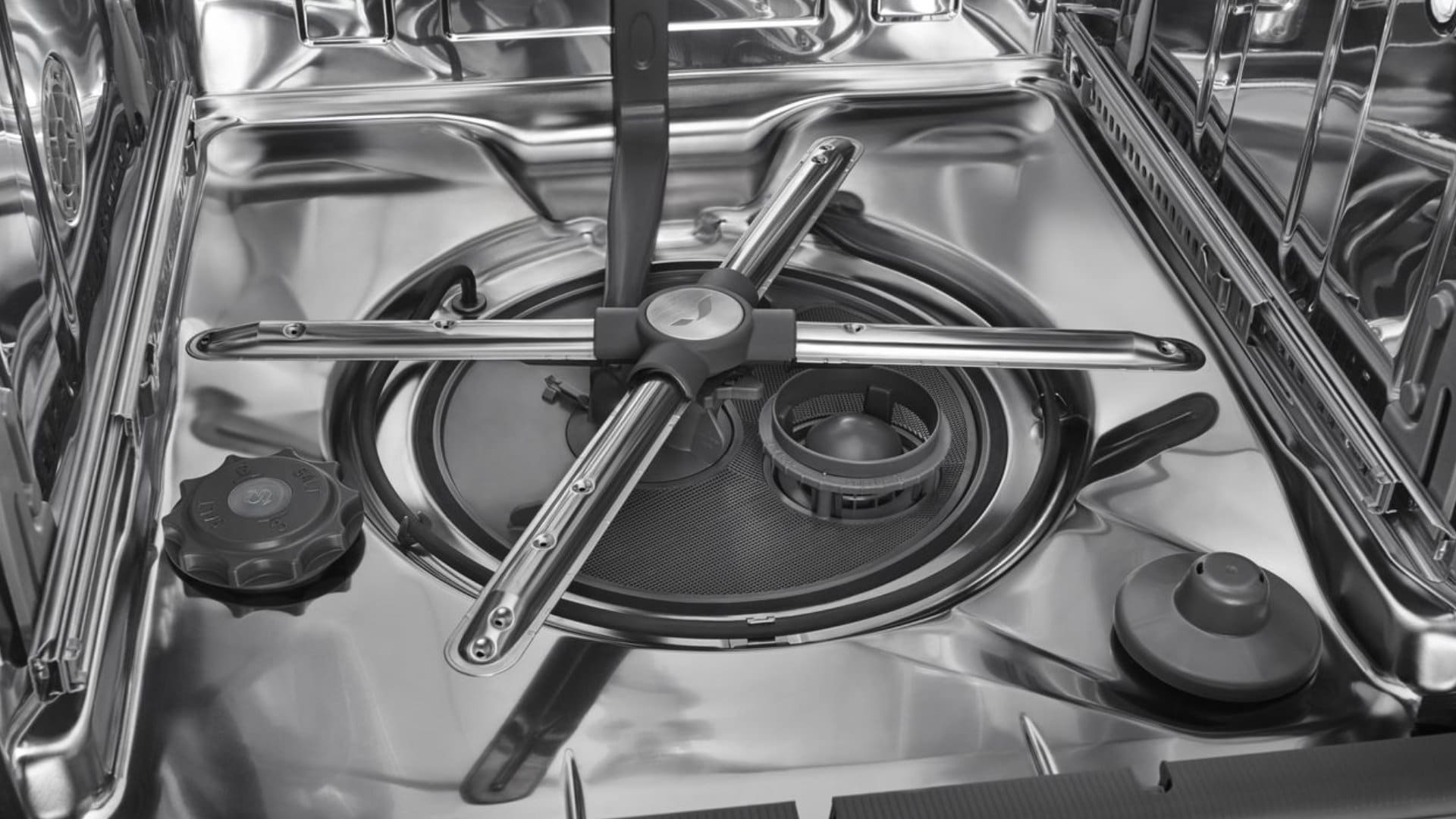
The filter system is at the very bottom of the dishwasher, below the lower spray arm. It usually has two parts: a large coarse filter and a fine filter cylinder inside it.
- Pull out the bottom dish rack.
- Look at the bottom floor of the dishwasher.
- You will see the filter assembly. It often looks like a cylinder and a flat screen around it.
How to Clean It
Kitchenaid filters are often removed by twisting.
- Turn the cylinder filter counter-clockwise to unlock it.
- Lift the cylinder filter straight up and out.
- Underneath or around the cylinder, you might find a flat filter screen. Lift this screen out as well.
- Take the filter parts to your sink.
- Rinse them under warm running water. Use a soft brush (like a bottle brush or old toothbrush) to gently scrub away food bits, grease, and debris.
- Check the area where the filters sit inside the dishwasher. Look for any large food pieces or objects that might have been caught. Remove them.
- Once the filters are clean, put them back in the dishwasher.
- Make sure the flat screen is in place first.
- Put the cylinder filter back in its spot.
- Turn the cylinder clockwise until it locks into place. It should sit flat and secure. If it’s not seated correctly, the dishwasher won’t clean well and might still have drain issues.
After cleaning the filter, close the door and try running a short cycle (like a rinse-only cycle) to see if it drains. If the water is still there, move on to the next step.
Checking the Drain Hose
The drain hose carries the water away. If it’s blocked or bent, water can’t leave. This is how you unclog Kitchenaid dishwasher drain hose. You’ll need towels and possibly a bucket, as there will likely be water in the hose. Make sure the power is off.
Locating the Hose
The drain hose connects to the back of the dishwasher near the bottom. It runs to your sink drain or garbage disposal.
- You might need to carefully pull the dishwasher out from under the counter a little bit. This can be tricky and requires disconnecting power and water supply lines. If you are not comfortable doing this, you might need help.
- Alternatively, you might be able to access the hose connection under your sink.
Looking for Kinks
Follow the hose from the dishwasher to where it connects under the sink.
- Look for any sharp bends, twists, or kinks in the hose.
- Straighten out any kinks you find. Make sure the hose has a gentle slope downwards towards the drain, not upwards. The hose usually loops up high under the counter before going down to the drain to prevent drain water from flowing back. Make sure this high loop is correct, but the path from the high loop to the drain connection should go down.
Clearing Blockages
If there are no kinks, there might be something inside the hose.
- Place towels and a bucket under the hose connection points.
- Disconnect the drain hose from the drain pipe under the sink or the garbage disposal. There might be a clamp you need to loosen. Be ready for water to come out.
- Look into the end of the hose you just disconnected. Can you see anything blocking it?
- You can try blowing air through the hose. Or use something flexible like a plumber’s snake, a long brush, or even a straightened coat hanger to gently push through the hose and clear any blockages. Be careful not to puncture the hose.
- Once you think the hose is clear, reconnect it securely. Make sure the clamp is tight.
After checking and clearing the hose, push the dishwasher back carefully (if you pulled it out) and turn the power back on. Run a short cycle to test.
Checking the Air Gap
If your kitchen sink has an air gap (that small cap on the counter), it’s worth checking.
What the Air Gap Does
The air gap makes sure there’s a gap of air in the drain line. This stops dirty sink water from going into your dishwasher if the sink drain backs up. Water from the dishwasher pumps into the air gap, then flows down into the sink drain or disposal.
How to Clean It
An air gap can get clogged with food or grease.
- Turn off the power to the dishwasher and the garbage disposal (if you have one connected).
- Remove the cover from the air gap on your counter.
- You will see two hoses connected to the air gap fitting. One hose comes from the dishwasher, the other goes to the drain or disposal.
- Check the inside of the air gap fitting for blockages. Food bits can get stuck here.
- You can use a small brush or a cotton swab to clean inside the fitting.
- Check the hoses connected to it for blockages near the air gap. You might be able to gently clear them from the top.
- Put the air gap cover back on.
Turn the power back on and test the dishwasher.
Checking the Garbage Disposal
If your dishwasher drain hose connects to your garbage disposal, make sure the disposal isn’t causing the problem.
If Your Hose Connects Here
Look under the sink. If the dishwasher hose connects to a small opening on the side of the garbage disposal unit, this applies to you.
Making Sure It’s Clear
- Make sure the garbage disposal itself is clear of food and working properly. Run it with water for a moment to clear any lingering debris.
- Important: If the garbage disposal is new, check the connection point where the dishwasher hose attaches. There is often a knockout plug (a small plastic piece) inside that must be removed before connecting the dishwasher hose. If this plug is still in place, no water can drain from the dishwasher through the disposal. Turn off power to the disposal, disconnect the dishwasher hose, and use a screwdriver and hammer to carefully knock out the plug from the inside of the disposal fitting. Reconnect the hose securely.
Turn power back on and test the dishwasher drain.
Examining the Drain Pump
The Kitchenaid dishwasher drain pump is the part that pushes water out. If it’s the problem, you might need help, but you can do some basic checks. Always turn off the power before this step.
What the Pump Does
The drain pump is a small motor located near the bottom of the dishwasher. It activates at the end of the cycle to force water out through the drain hose.
Simple Pump Checks
Sometimes, small items get into the pump area and stop the impeller (the spinning part).
- Remove the lower dish rack and the filter system (both the cylinder and flat screen, as shown in the filter cleaning step).
- Look down into the area where the filter sits. You might see the pump intake cover or the impeller itself.
- Use a flashlight to look for any objects like glass shards, plastic pieces, seeds, or bones.
- Carefully use pliers or tweezers to remove any objects you can see.
- Try to gently turn the impeller with your finger (power must be off!). It should turn freely. If it feels stiff or won’t move, there might be something you can’t see, or the pump motor might be locked up.
When the Pump Might Need More
If you removed blockages and the impeller still won’t turn freely, or if the pump seems to run but no water moves, the pump itself might be broken. Replacing a drain pump is a more complex repair Kitchenaid dishwasher drain problem. It involves tilting the dishwasher or pulling it out completely and working underneath. If you’re not comfortable with this, it’s time to consider calling a repair person.
Manual Ways to Get Water Out
If your dishwasher has Kitchenaid dishwasher standing water and the drain system isn’t working, you need to get the water out before you can work on it or use it again. This is how you can manual drain Kitchenaid dishwasher.
Using Towels and a Pot
This is the simplest method, best for small amounts of water.
- Open the dishwasher door.
- Place old towels on the floor in front of the dishwasher to catch spills.
- Use a small pot, cup, or scoop to bail out the water from the bottom of the tub. Pour the water into a bucket or directly into the sink.
- Use towels or sponges to soak up the remaining water.
Using a Wet/Dry Vacuum
A wet/dry vacuum (Shop-Vac) is much faster and more effective for larger amounts of water.
- Open the dishwasher door.
- Make sure the vacuum is set up for wet pickup.
- Insert the vacuum hose into the bottom of the dishwasher tub.
- Turn on the vacuum to suck up the water.
- You can also use the vacuum to try and suck water and potential blockages from the drain opening where the filter sits.
Getting the water out lets you safely work on the filter area and makes it easier to see if your fixes are working when you test.
What Dishwasher Lights and Codes Mean
Sometimes, your Kitchenaid dishwasher will try to tell you what’s wrong by showing lights or a Kitchenaid dishwasher error code. If you see a code on the display or blinking lights, check your dishwasher’s user manual.
Common Codes for Drain Issues
Kitchenaid error codes often start with an F followed by a number, and sometimes an E. Codes related to draining often point to the pump not running or water not leaving fast enough.
- For example, F2 or E1 might relate to a drain issue.
- The exact codes can vary by model number.
What Your Manual Tells You
Your user manual is the best place to find out what a specific Kitchenaid dishwasher error code means for your model. It will usually list the codes and suggest what might be wrong (like a clogged drain or pump issue). It might also tell you how to try and clear the code, which often involves a reset.
Knowing When to Call for Help
While many drain problems can be fixed with the steps above, some issues are more serious or require special tools and knowledge. Knowing when to call a professional for repair Kitchenaid dishwasher drain problem can save you time and prevent further damage.
Problems Beyond Simple Fixes
If you have cleaned the filter, checked the hose for kinks and blockages, checked the air gap and garbage disposal, and the drain pump impeller spins freely but the dishwasher still won’t drain, the problem is likely internal.
Complex Parts
Issues with the main drain pump motor or the electronic control board are harder to fix.
- Replacing the Kitchenaid dishwasher drain pump requires accessing the underside of the dishwasher, which can be difficult and involves electrical connections.
- Problems with the control board require electrical knowledge and testing.
If you are not comfortable with electrical work or taking apart major appliances, calling a qualified appliance repair technician is the safest and most effective option for these complex issues. They have the tools and experience to diagnose and fix problems with parts like the pump or control board correctly.
Helping Prevent Drain Issues
Taking care of your dishwasher can help stop drain problems from happening in the first place. Prevention is easier than fixing Kitchenaid dishwasher standing water.
Best Habits for Your Dishwasher
- Scrape Your Plates: Before loading dishes, scrape off large food pieces, bones, seeds, and toothpicks. These are the main culprits for clogging filters, hoses, and pumps. You don’t need to rinse, just scrape the big stuff.
- Use the Right Detergent: Use automatic dishwasher detergent made for dishwashers. Too much soap or the wrong kind can create lots of suds that don’t drain well.
- Run the Disposal: If your dishwasher drains into a garbage disposal, run the disposal briefly before starting the dishwasher to make sure the drain path is clear.
- Hot Water: Make sure your hot water heater is set correctly (around 120°F or 49°C). Hot water helps dissolve grease, which can build up and cause clogs. Running the hot water at the sink before starting the dishwasher ensures hot water enters the machine right away.
Keeping the Filter Clean Often
This is perhaps the most important preventative step. Make cleaning the filter a regular task.
- How often depends on how much you use the dishwasher and how well you scrape dishes.
- For most homes, checking and cleaning the filter once a month is a good idea. If you see food bits building up quickly, do it more often.
- A clean filter lets water flow freely and protects the drain pump from damage.
By doing these simple things, you greatly reduce the chance of your Kitchenaid dishwasher won’t drain.
Giving Your Dishwasher a Fresh Start
Sometimes, electronics just need a reboot. A reset Kitchenaid dishwasher can clear temporary glitches that might be stopping the drain cycle from starting. This is a quick thing to try if you have Kitchenaid dishwasher standing water but can’t find a clog.
How to Do a Simple Reset
The exact reset method can differ slightly by model. Check your manual for the specific steps. A common way is:
- Open the dishwasher door slightly.
- Press and hold the “Cancel” or “Cancel/Drain” button for a few seconds (often 3 seconds).
- Close the door. The dishwasher should start a short drain cycle (usually around 2 minutes) and then turn off.
- If your model doesn’t have a cancel button like that, or the manual says otherwise, try turning off power to the dishwasher at the circuit breaker for 5-10 minutes. Then turn the power back on.
Why a Reset Can Help
A reset clears the control board’s memory. If a temporary error or power fluctuation caused the drain issue, a reset might fix it. It’s always worth trying after you’ve checked for physical blockages, or if the dishwasher showed a Kitchenaid dishwasher error code that you can’t explain.
Frequently Asked Questions (FAQ)
-
Q: Why is there standing water in my Kitchenaid dishwasher?
A: This usually happens because the dishwasher cannot drain the water out. Common reasons include a clogged filter, a blocked drain hose, a problem with the drain pump, a clogged air gap, or an issue with your garbage disposal if it’s connected. -
Q: What is the easiest thing to check first if my Kitchenaid dishwasher won’t drain?
A: The easiest first step is to check and clean the dishwasher’s filter at the bottom of the tub. This is the most common cause of drain issues and is simple to fix. -
Q: How do I manual drain Kitchenaid dishwasher?
A: Turn off power first. Use towels and a small pot or cup to scoop out the water from the bottom of the tub. A wet/dry vacuum is very effective for removing standing water quickly. -
Q: Can a clogged garbage disposal stop my dishwasher from draining?
A: Yes, if your dishwasher’s drain hose connects to your garbage disposal, a blockage in the disposal or even a leftover plug in the connection point can prevent the dishwasher from draining properly. -
Q: How do I reset Kitchenaid dishwasher?
A: One common method is to press and hold the “Cancel” or “Cancel/Drain” button for a few seconds (often 3 seconds) with the door slightly open, then close the door to start a short drain cycle. Another way is to turn off the power to the dishwasher at the circuit breaker for 5-10 minutes. Always check your manual for the specific method for your model. -
Q: My Kitchenaid dishwasher has an error code about draining. What should I do?
A: Look up the specific Kitchenaid dishwasher error code in your user manual. The manual will tell you what the code means and what to check, usually related to drain speed or pump issues. Address the potential cause (like cleaning the filter or checking the hose). -
Q: When should I call a professional to repair my Kitchenaid dishwasher drain problem?
A: If you have checked and cleared the filter, drain hose, air gap, and garbage disposal, and the drain pump impeller seems clear but the dishwasher still doesn’t drain, the problem might be a faulty drain pump or control board. These are more complex repairs, and it’s best to call a qualified technician if you are not comfortable working with internal parts and electrical components. -
Q: How can I prevent my Kitchenaid dishwasher from having drain problems again?
A: Regularly clean your dishwasher’s filter (ideally once a month). Scrape large food particles off dishes before loading. Ensure your garbage disposal (if connected) is clear. Use the correct type and amount of dishwasher detergent.