Can you unplug a KitchenAid refrigerator at any time? Yes, you can unplug a KitchenAid refrigerator at any time, but it’s best to do it when you’re not storing a lot of perishable food. This guide will show you how to do it safely.
Refrigerators are vital appliances in our kitchens, keeping our food fresh and safe to eat. Most of the time, they run quietly in the background. However, there are times when you might need to turn off your KitchenAid refrigerator. This could be for cleaning, moving the appliance, or during a power outage. Knowing how to do this safely is important to protect both your appliance and your food. This guide will walk you through the simple steps to turn off KitchenAid fridge safely and effectively.
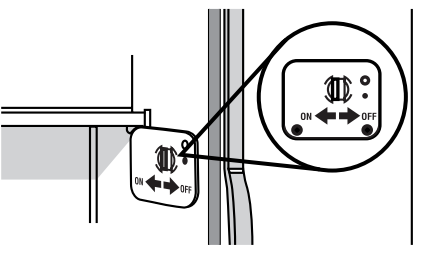
Image Source: producthelp.kitchenaid.com
Why Turn Off Your KitchenAid Refrigerator?
There are several common reasons why you might need to turn off KitchenAid refrigerator:
- Deep Cleaning: A thorough cleaning is much easier when the refrigerator is empty and the power is off. This prevents food from spoiling and makes it easier to reach all areas.
- Moving the Appliance: Before moving your KitchenAid fridge, you need to defrost it and turn it off to prevent damage during transit.
- Power Outages: If you anticipate a prolonged power outage, turning off the refrigerator can sometimes help conserve energy and prevent surges when power is restored. However, if the power is already out, the refrigerator will naturally shut off.
- Maintenance or Repairs: If your refrigerator needs servicing or minor repairs, turning off the power is a crucial safety step.
- Seasonal Storage: If you’re storing your KitchenAid appliance for an extended period, such as during a renovation or when moving to a new home, you’ll need to power it down.
Locating the Power Source for Your KitchenAid Fridge
The most straightforward way to Kitchenaid fridge power off is by disconnecting it from its power source. This is usually a standard electrical outlet.
The Wall Outlet Method
- Identify the Plug: Locate the power cord for your KitchenAid refrigerator. It typically extends from the back of the unit, often near the bottom.
- Trace the Cord: Follow the cord to the wall outlet.
- Unplug Carefully: Firmly grasp the plug itself, not the cord, and pull it straight out from the outlet. Avoid yanking on the cord, as this can damage the wiring.
This is the most direct way to unplug KitchenAid fridge.
Using the KitchenAid Refrigerator Control Panel (If Available)
Some newer KitchenAid refrigerator models have a feature that allows you to temporarily disable the cooling system or put the refrigerator into a standby mode via the Kitchenaid refrigerator control panel. This isn’t the same as a full power off but can be useful for short-term needs like cleaning.
- Check Your Manual: Refer to your specific KitchenAid refrigerator’s user manual. It will detail if there’s a specific power-saving mode or a way to temporarily disable cooling through the control panel.
- Control Panel Functions: Look for buttons or settings labeled “Power,” “Sabbath Mode” (which often disables lights and cooling for religious observance), or “Vacation Mode.” These can sometimes achieve a similar result to a full power off, although they might not completely cut all power.
Important Note: While the control panel might offer options to reduce cooling or disable certain functions, disconnecting the power cord from the wall outlet is the only way to completely shut off all power to the appliance. This is what is meant by truly turning off the refrigerator.
Preparing Your KitchenAid Refrigerator for Powering Down
Before you disconnect KitchenAid fridge, there are a few steps to take to ensure a smooth process and protect your food.
Emptying the Refrigerator
- Assess Your Food: Determine how much food you have and how long you anticipate the refrigerator being off.
- Use Coolers: For short-term power outages or if you’re cleaning, transfer perishable items to a cooler with ice packs.
- Prioritize: Move items that spoil quickly, like dairy and meats, to the top of your cooler.
- Minimize Door Opening: The less you open the refrigerator doors, the longer the internal temperature will be maintained.
Defrosting the Freezer (If Necessary)
If you plan to turn off your refrigerator for an extended period or for thorough cleaning, defrosting the freezer is often a good idea.
Steps for Defrosting:
- Empty the Freezer: Remove all food items from the freezer compartment.
- Place Towels: Lay towels and shallow pans on the bottom shelves and floor to catch melting ice and water.
- Open Doors: Leave both refrigerator and freezer doors open to allow air circulation and speed up the defrosting process.
- Speeding Up Defrosting (Optional): You can place bowls of hot water inside the freezer or use a hairdryer on a low setting (held at a safe distance and moving constantly) to melt ice more quickly. Be cautious not to damage any internal components with heat.
- Clean Up: Once the ice has melted, wipe down the interior surfaces with a mild detergent and water. Ensure it’s completely dry before closing the doors.
This process helps to reset Kitchenaid refrigerator‘s internal conditions and prevents potential issues from moisture.
The Safest Way to Turn Off Your KitchenAid Refrigerator
Now that you’ve prepared your appliance, let’s go through the safest way to Kitchenaid fridge power off.
Step-by-Step Guide to Disconnecting Power
- Ensure Doors Are Closed: Make sure both the refrigerator and freezer doors are firmly closed after you’ve emptied and prepped them. This helps maintain the cold temperature for as long as possible.
- Locate the Power Cord: Find the power cord extending from the back of your KitchenAid refrigerator.
- Grasp the Plug: Reach down and firmly grasp the plug that is inserted into the wall outlet.
- Pull Straight Out: Gently but firmly pull the plug straight out of the outlet. Never pull on the cord itself. This could fray the wires or damage the connection.
- Verify Power is Off: The lights inside the refrigerator should turn off immediately, confirming that the Kitchenaid appliance power has been disconnected.
This method ensures that the refrigerator is completely de-energized.
Understanding Appliance Power Settings
While the primary way to disable Kitchenaid refrigerator is by unplugging it, some models have specific settings that can influence power consumption or cooling.
- Vacation Mode: This mode typically reduces cooling to save energy while you’re away, but it doesn’t fully shut down the appliance.
- Sabbath Mode: This mode disables lights, alarms, and often the cooling cycle to comply with religious observances. It’s a form of temporary deactivation but not a complete power cut.
To truly turn off Kitchenaid freezer and refrigerator sections, unplugging is the surest method.
What to Do While Your KitchenAid Refrigerator is Off
Once your KitchenAid refrigerator is off and unplugged, you can proceed with your planned activity.
Cleaning and Maintenance
- Interior Cleaning: This is the ideal time to deep clean the interior. Use a mild soap and water solution. For stubborn stains, a baking soda paste can be effective.
- Exterior Cleaning: Wipe down the exterior surfaces, including door handles and seals.
- Condenser Coils: If accessible, cleaning the condenser coils (usually located at the back or underneath the unit) can improve efficiency. Use a vacuum cleaner with a brush attachment or a coil cleaning brush. Ensure the refrigerator is unplugged before cleaning coils.
- Check Seals: Inspect the door seals for any damage or wear. Clean them gently to ensure a good seal when the appliance is turned back on.
Moving the Refrigerator
- Defrost Completely: Ensure the freezer is fully defrosted and any excess moisture is dried.
- Secure Doors: Use moving straps or strong tape to secure the refrigerator and freezer doors to prevent them from opening during the move.
- Protect the Exterior: Wrap the appliance in moving blankets or plastic wrap to prevent scratches and dents.
- Keep Upright: Whenever possible, transport the refrigerator in an upright position. If it must be tilted, try to keep the tilt to a minimum and for the shortest possible time.
How to Turn Your KitchenAid Refrigerator Back On Safely
After your cleaning, maintenance, or move is complete, it’s time to power your refrigerator back up.
Reconnecting and Starting Your KitchenAid Fridge
- Ensure Dryness: Make sure the interior of the refrigerator and freezer is completely dry, especially after defrosting or cleaning.
- Plug It In: Firmly insert the power plug back into the wall outlet.
- Set Temperatures: Once powered on, you’ll need to set your desired temperatures on the Kitchenaid refrigerator control panel. Refer to your user manual for recommended settings.
- Allow Cooling Time: Give the refrigerator at least 4-6 hours (and sometimes up to 24 hours) to reach its optimal operating temperature before loading it with food. This is crucial for food safety.
- Check Operation: Listen for the compressor to start running and check that the interior lights are on.
Resetting Kitchenaid Refrigerator Settings
After reconnecting power, you may need to reset Kitchenaid refrigerator settings to your preferred temperature levels.
- Control Panel Navigation: Use the Kitchenaid refrigerator control panel to adjust the temperature for both the refrigerator and freezer compartments.
- Refer to Manual: Consult your owner’s manual for specific instructions on setting temperatures and any other customizable Kitchenaid refrigerator settings.
Troubleshooting Common Issues After Powering Off
Sometimes, after being Kitchenaid fridge unplugged, you might encounter minor issues.
What If The Refrigerator Doesn’t Turn On?
- Check the Plug: Ensure the plug is fully inserted into a working outlet.
- Test the Outlet: Plug another appliance into the same outlet to confirm it’s receiving power.
- Circuit Breaker: Check your home’s electrical panel to see if a circuit breaker has tripped.
- Delay Start: Some models have a built-in delay to protect the compressor. Wait a few minutes before assuming it’s not working.
- Contact Support: If none of these steps resolve the issue, it might be time to contact KitchenAid customer support or a qualified appliance technician.
What If The Refrigerator Is Making Unusual Noises?
- Normal Sounds: Refrigerators make various noises during operation, such as humming, clicking, or bubbling. These are often normal.
- New Noises: If you hear new or unusually loud noises after reconnecting power, check if the unit is level and if anything is vibrating against the back or sides.
- Consult Manual: Your manual may have a section on normal operating sounds and what to do if you hear something unusual.
Important Considerations for KitchenAid Appliances
When dealing with any Kitchenaid appliance power needs, always prioritize safety and consult your owner’s manual.
Safety First!
- Always Unplug for Repairs or Deep Cleaning: Never attempt internal repairs or cleaning without ensuring the appliance is completely disconnected from power.
- Keep Cords in Good Condition: Regularly inspect the power cord for any signs of damage. If it’s frayed or damaged, it needs to be replaced by a professional.
- Avoid Overloading Outlets: Don’t plug your refrigerator into an outlet that’s already powering multiple high-wattage appliances.
Consulting Your Owner’s Manual
Your KitchenAid refrigerator owner’s manual is an invaluable resource. It contains specific information tailored to your model, including:
- Detailed instructions on how to reset Kitchenaid refrigerator settings.
- Guidance on using special modes like Sabbath or Vacation mode.
- Troubleshooting tips for common issues.
- Information about Kitchenaid refrigerator settings for optimal performance.
Frequently Asked Questions (FAQ)
Q1: How long can I leave my KitchenAid refrigerator unplugged?
A1: You can leave your KitchenAid refrigerator unplugged for as long as needed. However, if you plan to unplug it for more than a few hours, it’s recommended to empty it of perishable food and clean and dry the interior to prevent odors and mold.
Q2: Will unplugging my KitchenAid refrigerator reset the control panel?
A2: Yes, unplugging the refrigerator will typically reset the control panel and any programmed Kitchenaid refrigerator settings. When you plug it back in, you may need to re-enter your preferred temperature settings.
Q3: Is it safe to turn off my KitchenAid refrigerator during a thunderstorm?
A3: It’s generally a good idea to unplug sensitive electronics, including refrigerators, during a severe thunderstorm with lightning. This helps protect the appliance from potential power surges.
Q4: My KitchenAid fridge is making a loud buzzing noise after I plugged it back in. What should I do?
A4: Some buzzing is normal as the compressor starts. However, if the noise is excessively loud or different from what you’ve heard before, check that the unit is level and nothing is touching the back or sides. If the noise persists, consult your owner’s manual or contact KitchenAid support.
Q5: What is the best way to store food while my KitchenAid refrigerator is off?
A5: For short periods (a few hours), keeping the doors closed will retain the cold. For longer periods, use well-insulated coolers packed with ice or gel packs. Minimize opening the coolers to keep them cold longer.
By following these simple steps, you can confidently and safely turn off your KitchenAid refrigerator when needed, ensuring the longevity and proper function of your appliance.